POS Software vs Cash Registers: Which Is Better for You?
The technology that you employed for processing sales was the heart of your business activity. For many years, the loud mechanical cash register was the common sound that indicated the completion of a transaction among customers. Nowadays, this sound has been overtaken by the very gentle knocking of a POS system and its seamless integration. The major question for business owners in Ghana and around the world is not simply about payment processing anymore, but rather about which system not only meets current requirements but also allows for the expansion of the customer base, the automation of processes, and the gain of a competitive advantage. This comprehensive guide outlines the key differences between cash registers and modern POS software, enabling you to make an informed decision for your business's future.
The Difference between POS and Cash Registers
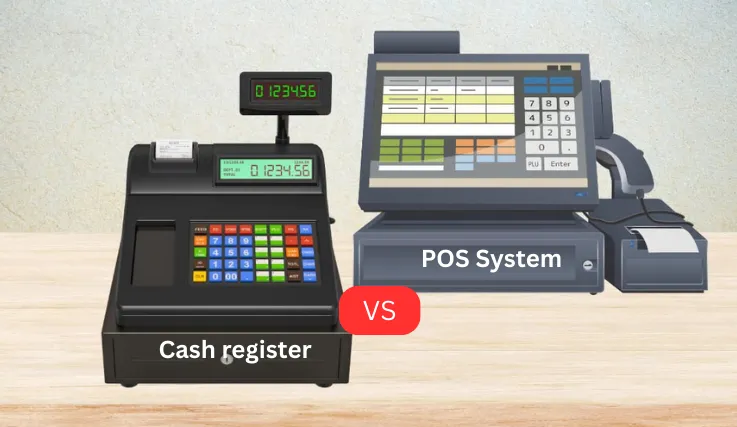
Two different devices are involved in one sale process, and to some extent, are similar only in this regard. A cash register is basically and most importantly a calculator, either mechanical or electronic, with a separate compartment to safely keep cash. A cash register's major functions are recording sales, processing returns, and providing receipts, and it is still the most basic and limited of all sales-related devices.
On the other hand, the new invoice system or POS software is opposite. Its power is in the integrated business management platform, which includes a physical cash drawer and receipt printer. However it can also be on a tablet, personal computer, or a dedicated terminal, software that provides the power of the POS system is what connects the barcode scanners, customer displays, and card machines, and most importantly, it is often cloud-based, so sales and customer data, as well as inventory, are stored securely online, accessible from anywhere and at any time. The principal difference is that the cash register is merely a tool used for handling financial transactions, while the POS system acts as the central nervous system that controls all business operations.
Functionality, Automation, and Data Management
The design in basic design resulted in a huge gap in the areas of functionality, automation, and data management.
- Functionality: The cash register is very limited in its functions; it only performs a few operations, cash sales, gives simple sales reports (which usually consist of Z-readings showing the total sales, tax, and number of transactions), and keeps cash safe. The POS system, on the other hand, can do all the above and more. It manages complex and minute inventory stocks in real-time, records every customer's purchase history, accepts various modes of payment (cash, card, mobile money), controls staff and their access levels, produces detailed and versatile sales reports, and even cooperates with e-commerce and accounting software.
- Automation: Automation is the main ingredient for efficiency, and this is the area where POS software really exceeds its competitors. Take inventory management, for instance: a cash register leads to an elaborate, inaccurate process of stock tracking done manually, mainly through pen and paper or a separate Excel sheet. A POS system completely takes over this process and controls it electronically. When a product is sold, the inventory count will decrease by the amount of that sale. You can enable low-stock alerts that will automatically notify you to re-order the concerned products, thus eliminating stockouts and preventing over-ordering. Just like that, end-of-day reconciliation is done automatically, and at the same time, very comprehensive reports are produced with just a click of a button, thus saving the manual work of several hours.
- Data Management: A cash register will give you data, but a POS system will give you information. The data from a cash register is nothing but a plain historical record—it shows you what products were sold and at what prices. The data from a POS system is dynamic business intelligence. It can identify the customers who are buying most of your products, the items that generate the most revenue, the times of the day when your sales are at their peak, and the trends in your sales. Such a comprehensive analysis enables you to base your decisions on facts rather than intuition in cases of marketing, promotions, staff, and purchases, hence converting raw data into a strategic asset.
Pros and Cons of Each Option
1. Traditional Cash Registers: The Established Workhorse
- Pros:
- Lower Initial Cost: The most important benefit is the purchase price at the beginning. It will cost you a lot less to have a basic electronic cash register than to go for a full POS installation.
- Simplicity and User-Friendliness: The cash register is an easy option for a tiny business selling a few uncomplicated products. The training of staff will not take much time.
- Dependability: Due to the lack of hardware parts and the fact that the cash register does not depend on an internet connection for its main functions, it can be seen as having fewer technical glitches.
- Cons:
- Restricted Functionality: It executes a single function quite decently, yet there are no provisions for other crucial business activities.
- Manual and Time-Consuming: Things like inventory management, sales reporting, and financial reconciliation are all manual jobs which is time-consuming and error-prone at the same time.
- Absence of Data Insights: The powerful tools that provide deep analytical insights into customer behavior and hence enable the business to grow strategically are totally missing.
- Unfavorable Scalability: A cash register will definitely become a bottleneck as your business develops because it won't be able to cope with the increased inventory complexity, as well as the multiple locations or advanced customer loyalty programs.
2. Modern POS Systems: The Strategic Partner
- Pros:
- Advanced Business Solution: The software is designed to handle multiple tasks like inventory, sales, CRM, and employees through a single platform, thus simplifying business processes. For more on integrated solutions, check IPMC software solutions.
- Productivity and Precision like never before: The system increases productivity and decreases technical problems, thus helping you get closer to your customers and concentrate on business development.
- Business Data Conversion into Insights: The system, with the help of reporting and analytics features, will present a data-oriented and clear picture of the overall business performance, thereby facilitating more intelligent business decisions through the given information. Learn details about business data with accounting vs bookkeeping.
- Improved Customer Service: The customer service experience is improved to a great extent as services such as purchase history tracking, customer profiles, and integrated loyalty programs have become available for the customers to enjoy.
- Effortless Expansion: One of the many advantages of a cloud POS system is that it can be easily scaled up with your business. Adding new registers, controlling several store locations, and introducing new sales channels into the system are all parts of the process. Explore scalable ERP solutions at Best ERP.
- Remote Access and Mobility: By means of cloud-based systems, it becomes possible to have an eye on sales, take an inventory, or look through reports using a smartphone or a home computer. This scenario offers the user significant advantages in terms of control and flexibility.
- Cons:
- Higher Initial Investment: The amount of money needed for the purchase of the hardware, software, and the ongoing subscription fees is more than a one-time purchase of a cash register.
- Dependence on Internet Connectivity: Even though a great number of systems have an offline mode, usually only half of the functionalities will be available without a proper internet connection.
- Learning Curve: For the staff to be able to use the system to its fullest extent, there is a need for training owing to the wide range of features.
Cost, Efficiency, and Scalability
Every business owner often puts cost, efficiency, and scalability as the top three deciding concerns for the business.
- Cost Analysis: When it comes to cost, if we are to evaluate the decision purely by the initial costs, then the cash register would be the winner. But a Total Cost of Ownership (TCO) analysis usually shows a different story. The hidden costs of a cash register—manually calculating the inventory, losing money through stockout or theft because of a lack of proper tracking, and losing sales opportunities because the customers are not well understood—can be much greater than the original savings. A POS system, even if there is a higher initial cost involved, is a money-making investment that will save time, lower error rates, and boost sales in the long run.
- Efficiency Benchmark: The most used gauge of how efficient a system is comes from the level of both time and accuracy. On purpose, a cash register is designed to be inefficient. All the activities related to a sale are done manually. On the other hand, a POS system is considered the greatest source of efficiency. It helps in the automation of tiring and full of errors activities. As a result, you and your staff will be able to get more things done in less time and with a higher level of accuracy. In itself, this means more income in the long run as the company now spends less on its operation and the customers are served better.
- Scalability for Growth: A system’s scalability is the main factor that determines whether this system can grow as big as the company. Not even a single drop of scalability can be found in a cash register, which, in fact, is a fixed machine. But a POS system will be there for your growth, thereby being in the complete opposite direction of a cash register. The fact is that, when choosing a POS system, you are not only getting a benefit on scalability but a must-have solution for the business that is expanding.
Why Modern Businesses Prefer POS Systems
The transition of businesses to POS systems is a really huge move. Unlike previous years, indeed, the shift is more of a revolution than just a turn or a trend. The modern-day POS systems are quite often the choice of businesses from retail stores through restaurants, salons, and service providers, employing the software since it is one of the few ways to gain a sustainable competitive edge. Hence, the business operating at a tempo much higher than the one that is being generated by the market, such as Nestle Ghana, where the attitude of the customer is very high and the barriers to entry are very low, being able to tackle the operation in a highly efficient way and at the same time having a total customer understanding becomes a critical issue.
Modern POS systems give customers payment flexibility and are seamlessly integrating mobile money and digital payment methods alongside the traditional methods of cash and card are widespread in Ghana. Moreover, the game-changer of the cloud-based POS is the remote management capabilities. Imagine a business owner in Accra easily tracking and managing a Kumasi branch's real-time performance, thereby always ensuring stable operations and hence centralized control.
The preference really comes from changing and shifting one's worldview. Shop owners are no longer merely sellers, but are rather administrators of advanced centers. This is why they want a system that, in addition to just noting things down, helps them shape their pathway to the future. The POS system being there provides the organizations with the necessary pieces to test the waters in the past, handle matters in the present, and also for strategic planning in the future. It converts a business from a reactionary establishment into a forward-looking, data-driven entity.
In summary, just before making a decision, you should keep in mind three crucial differentiators. First, configuration: defining simple prices or full stock control, different VAT rates or just one tax, various payment methods, or cash only. Secondly, customer experience: line-ups at the front desk, unhappy customers due to long waits, incorrect payments, and frustrated staff. Finally, transactions: the speed at which you process payments, real-time stock updates, online orders that are automatically pushed to the store, or the system just being used to collect cash.